Marketing Automation
January 14 2026

"If it was Salesforce, it would have crashed and logged me out" I joked with a colleague as we looked through a function in Braze together. I like Salesforce but it is not seamless. However, Braze has many intuitive features and one of these is the User Update Step in Canvas.
It's a somewhat anonymous part of Canvas that can do a lot of interesting things in the right hands.
To illustrate, I'll share 3 practical examples that are actually more than just gimmicks and can really improve your work.
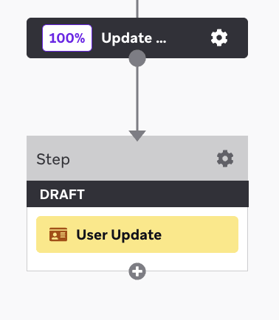
User Update is a Canvas Component that allows you to update users' attributes, events and purchases without messing with APIs.
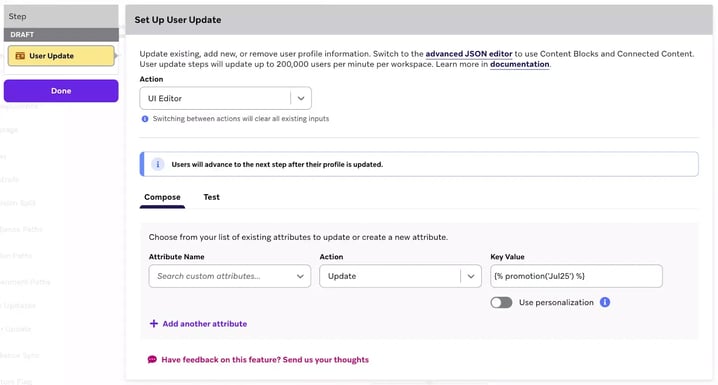
And you can do this in a simple menu or by writing some code. So it's a simple tool that can also do a bit more, if you like.
You can update a custom attribute, delete a custom attribute, increase or decrease the value of a custom attribute or update an array (list).
In some industries and markets, companies need to provide notice about active subscriptions or accounts, for example every six months.
A need that can be solved with User Update. If the subscription start date (or equivalent) is registered in the system as an attribute, a check can be set up in the JSON Editor to see if today's date is one of these 'six months'.
The logic looks simple like this:
Compare today's date with the date the last active subscription started.
If it is evenly divisible by 180 (180,360,540,720 etc.), an attribute is written e.g. "Subscription_reminder" = 1
This means that you do not need to "hardcode" which dates the reminder should go out on, it takes care of the calculation.
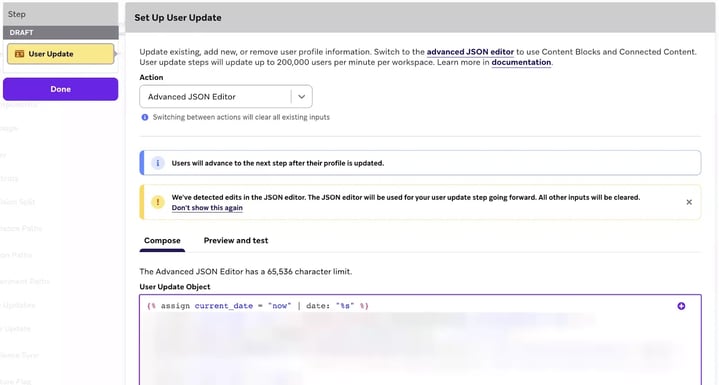
Then you can connect an email that is sent when you write this attribute to 1 and have one to Canvas with User Update which then resets the attribute to 0.
Note that the same idea (counting down to anniversaries and the like) can be used for other things.
A limitation with Braze Promotion Codes has long been that every time you share a code for a user, a new one is generated. So previously it has been difficult to send out a promotion code in a message and then later in, for example, a content card, remind you to use the same code.
With User Update, you can now easily save code against an attribute of the user that they can then easily reference. Read how to do this here.
Something Braze lacks is a scoring system. Not surprising since it's something that is usually associated with the B2B world. But there are definitely scenarios where it can be useful. Perhaps especially in situations where you don't yet have a need for a churn or loyalty model.
Here's an example:
The fictional company "TicketMeister" has a newsletter where they inform about which gigs and events will happen during the month.
Each event matches a category and its link in the email has a corresponding Link Alias. Around these Link Alias we can now build a system there:
Each click on a Link Alias for these categories adds 1 point for the attribute "interested_in_X" where X stands for the category in question. For example "humor" or "rock".
Another Canvas also reduces the score. We can imagine with 1 point each month if the total is more than 0. (this is so that the score does not increase infinitely and be some kind of measure of "current interest")
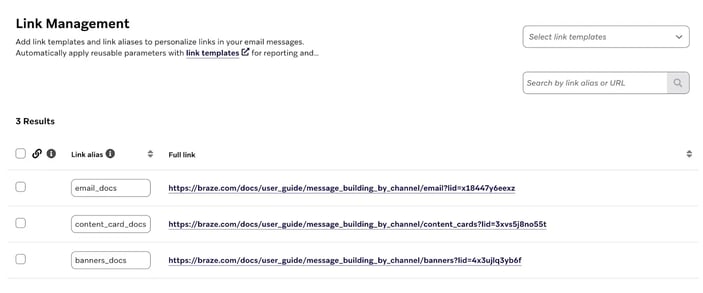
In this way, TicketMeister can create a simple scoring model of a customer's current interests, which can then be compared against each other to determine what content to show and in what order.
The interest score in this example can also be used to activate different Canvases.
One advantage over just creating segments directly on clicks on Link Alias is that either you have clicked and are included or you have not. It's a 1 and a 0. No difference in between and also missing the aspect of time. With a scoring system you can say that anything below 10 means you are not very interested and also take into account that interests change over time.
User Update is a powerful feature that unlocks more complex solutions. I look at it this way: User update allows you to write attributes and events on things that happen in the system as you can combine Action and API Entry Steps for Canvases together with available Liquid tags.
This way, as a system expert, you can bridge some of the gap between what you can do in the system "out of the box" and what requires skilled development.
It can be used as an alternative to, or as a proof of concept for things like recommendation engines or loyalty programs.
If you want help to effectively use the User Update Step or other parts of braze, or have questions, please contact us.
Hope this helps!